Beacon Pro Installation
The Beacon Pro is a versatile device that enhances audio tour experiences while maximizing visitor engagement.
Step 1: Unboxing
Section titled “Step 1: Unboxing”Unpack the Beacon Pro and activate it using the ON/OFF switch on the bottom.
Step 2: Charging
Section titled “Step 2: Charging”The battery provides up to 3 months of operation with regular use. Charge the device by connecting it to a power source via USB-C cable.
You can also:
- Use a powerbank for portable charging
- Permanently connect it to a power supply for continuous, low-maintenance operation
Step 3: Installation
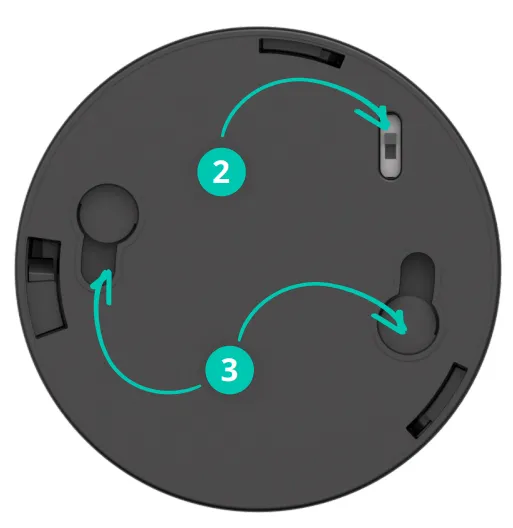
Section titled “Step 3: Installation”Mount the Beacon Pro at chest height, so that the beacons sit in roughly the same horizontal plane as the Podcatcher Pro devices visitors carry. Avoid placing objects between the beacon and the visitor for optimal UWB ranging.
- Do not cover the beacon with thick material — it reduces the range
- Keep it within reach for charging with a power bank, or connect a permanent USB-C charger. A permanent charger is recommended for beacons used for the Alarm
Step 4: Platform configuration
Section titled “Step 4: Platform configuration”Connect the Beacon Pro to relevant stops through the platform:
- Open Stop Settings
- Add a new beacon and select Beacon Pro
- Define the desired range
- Publish the changes
- Synchronize them to all Podcatcher Pro devices
The beacon automatically triggers audio content when visitors with a Podcatcher Pro enter the specified zone. For instance, a 2-meter radius creates a circular activation area.
Key features
Section titled “Key features”Automated triggering
Section titled “Automated triggering”Powered by UWB technology, it automatically plays audio content when a visitor enters.
Long battery life and power options
Section titled “Long battery life and power options”Operates on a single battery for up to 3 months, with USB-C charging or permanent power connection options.
User-friendly design
Section titled “User-friendly design”Visitors trigger content by scanning or entering designated zones. No complicated apps required.
Related articles
Section titled “Related articles”- What is a Beacon? — overview of beacon technology
- Beacon Pro Dimensions — size and weight specifications
- Battery Maintenance — keep your Beacon Pro charged